PawScheduler / Works offline
Dog grooming software that works without cell service
Why this matters for mobile groomers
You park in a client's driveway at the end of a country road, open your app to check the next address, and get a spinning wheel. Or a login screen. Or "something went wrong." Most booking apps assume you're always online. A van doesn't work that way: farm roads, basements, garages, metal buildings and bad hotel Wi-Fi all happen in a normal week.
What works with no signal
- The app opens. No login screen, no error page. It uses the login already saved on your phone.
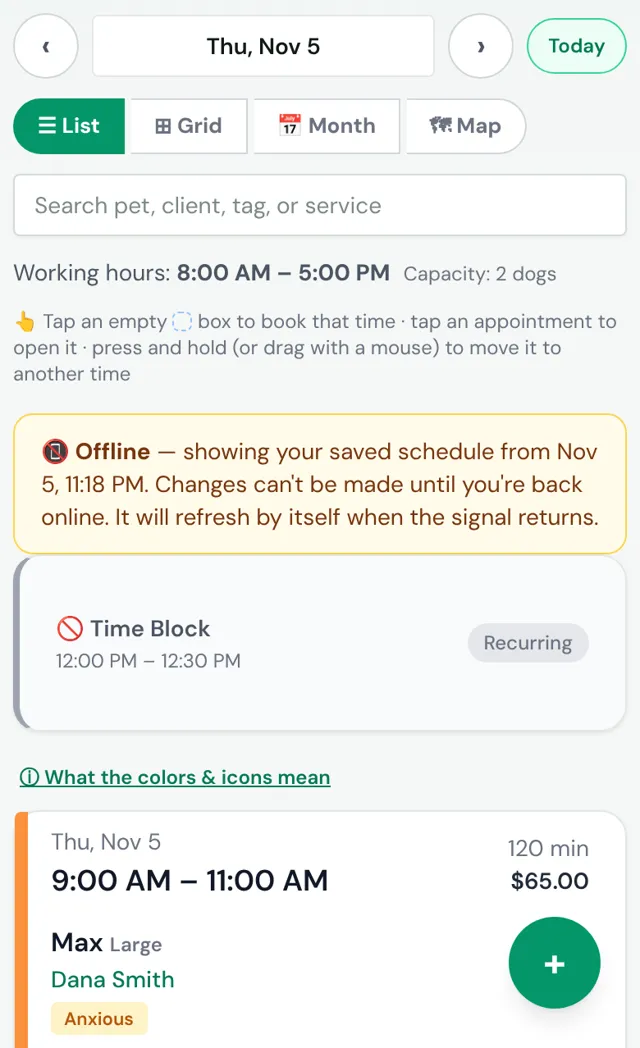
- Your schedule shows. The last 7 days you opened on that phone are saved, with times, clients, pets, services, prices and notes, including "bites" and "anxious" warnings.
- Call, text and directions buttons still open. They hand off to your phone's own call, Messages and maps apps (your maps app needs its own signal or offline maps for turn-by-turn).
- It catches up by itself. When the signal comes back, the day reloads with anything that changed. Nothing to tap.
What waits until you're back online
- Adding, moving or cancelling appointments, checking dogs in and out, and taking payments. These need a connection so your booking page and your phone never disagree about what's open.
- Days you haven't opened on that phone. If you never looked at Friday while you had signal, there's no saved copy of Friday yet.
We'd rather be clear about this than promise "full offline mode." A schedule you can read anywhere covers what a groomer actually needs in a dead zone: where to go next, who the dog is, and how to reach the client.
What keeps running while you're out of range
Your phone being offline doesn't stop your business. Reminders and your online booking page run on PawScheduler's servers, not on your phone. Clients still get their reminders and can still book. New bookings show up as soon as your phone reconnects.
How to get ready before you drive out
- Open tomorrow's schedule the night before, on Wi-Fi. Every day you open gets saved.
- Heading somewhere remote for a few days? Tap through each of those days while you have signal. The app keeps the last 7.
- Leave the app open in the background instead of swiping it closed.
- Add it to your home screen from your phone's browser, so it opens like an app.
- Download your area in your maps app (Google Maps and Apple Maps both have offline maps) if you rely on turn-by-turn in dead zones.
Is offline on the free plan?
Yes. The saved schedule works on every plan, including Free (up to 50 appointments a month, free forever, not a trial). Mobile groomers who want their whole day on a map in route order, plus texts from their own business number, usually pick Growth. See mobile dog grooming software for the rest of what's built for the road.
Common questions
Does PawScheduler work offline?
Partly, and on every plan. With no signal, the app still opens and shows your saved schedule for the last 7 days you opened on that phone, with client names, pets and notes. You can't make changes until you're back online, and it refreshes by itself when the signal returns.
Can I add or change appointments with no signal?
No. Booking, moving, checking in and taking payments need a connection, so nothing gets out of sync with your booking page. Write it down and add it when you're back in range.
Will clients still get reminders and be able to book while I'm offline?
Yes. Reminders and online booking run on PawScheduler's servers, not your phone, so they keep working while you're in a dead zone. New bookings show up when your phone reconnects.
How do I make sure my day is saved before I lose signal?
Open each day you'll need on Wi-Fi or good signal, for example tomorrow's schedule the night before. The app saves every day you open, and keeps the last 7. Leave the app open in the background rather than swiping it closed.
Do I need to download an app for offline to work?
No download. Add PawScheduler to your phone's home screen from the browser and it opens like an app, with or without signal.
Try it before your next dead zone
Free plan, no credit card. Send me your client list and I'll load it for you.
Start freeMore from PawScheduler
Comparisons
- Groomsoft alternative for solo groomers
- Pawfinity alternative for groomers
- Best dog grooming software in 2026 (7 compared)
- MoeGo alternative for solo groomers
- Gingr alternative for solo groomers
- DaySmart Pet alternative for solo groomers
- Time To Pet alternative for groomers
- GroomBoard vs PawScheduler
- Square alternative for dog groomers
- PawScheduler vs MoeGo
- PawScheduler vs Gingr
- PawScheduler vs DaySmart Pet
Guides
- Best software for solo dog groomers
- Mobile dog grooming software
- Dog grooming scheduling software
- How to reduce no-shows in dog grooming
- Scheduling daycare and grooming
- Dog grooming income calculator
- Dog grooming vaccine tracking
- Dog grooming report card examples
- PawScheduler FAQ
- How much to charge for dog grooming
- How to start a mobile dog grooming business
- How to get more dog grooming clients
- Free dog grooming software
Free templates
- Matted dog policy template
- Late arrival policy
- Holiday schedule texts
- Cancellation and no-show policy template
- Dog grooming waiver template
- Dog grooming text message templates
- Dog grooming intake form template