PawScheduler / Mobile grooming service areas
How to set mobile grooming service areas without losing money driving
Why zones matter: driving is unpaid time
Every minute between stops is a minute you're not grooming. Twenty minutes of driving between five stops is well over an hour and a half a day. Over a week that's often one or two grooms' worth of time spent in the van. Zoning your days doesn't add clients; it stops the ones you have from being spread across the map.
Want to put a number on your own time? Try the dog grooming income calculator.
An example: the same five dogs, two ways
Here's a Tuesday for a groomer who lives in the middle of town, with five regular clients. First the way most groomers start, booking whoever asks for Tuesday. Then the same day if Tuesday is only the North Side.
| Booked by whoever asks | Booked by neighborhood | |
|---|---|---|
| Stops | North, South, North again, East, West | Five stops, all on the North Side |
| Miles driven | About 89 | About 29 |
| Time in the van | About 2 hours 40 minutes | About 55 minutes |
| What you get back | Nothing | About 1 hour 45 minutes, enough for another groom, and roughly 60 fewer miles of fuel |
Example numbers to show the idea, at about 33 mph average. Your town, roads and clients will differ.
The dogs and the prices are the same. The only thing that changed is which day each neighborhood gets. That's what the steps below set up.
Step 1: Group your clients into 2–5 areas
List your regulars by town or ZIP code and look at where they cluster. Most solo mobile groomers end up with two to five areas, usually split by direction from home (north, east, south, west) or by town. Fewer, bigger areas are easier to keep to than many small ones.
Step 2: Give each area its days
Pick which days you work each area and stick to them. A simple week might look like this:
| Day | Area | Why |
|---|---|---|
| Monday | North (Hillside, Oak Park) | Most regulars, closest to home |
| Tuesday | East (Riverton) | Longer drive, so a full day there |
| Wednesday | North | Second day for the busiest area |
| Thursday | South + West | Smaller areas share a day |
| Friday | Flexible | Catch-ups, puppies, anything that didn't fit |
Keep one flexible day for clients who can't make their area's day.
Step 3: Set a home radius and a travel fee beyond it
Decide how far you go before travel costs extra. A simple rule is to include travel inside your usual area and add a small fee beyond it. To set the fee, multiply the extra miles (there and back) by your cost per mile, fuel plus wear, for example $0.65 a mile. Then round it into easy tiers.
Step 4: Only offer each area its days
The zones only work if bookings land on the right days. When a client asks for a time, offer their area's days first:
Step 5: Put each day in a sensible order
Within an area, book stops in a loop, not zigzags. Clients with flexible times ("any time Tuesday morning") are gold: they let you slot them where they add the least driving.
A service area worksheet
How PawScheduler handles service areas
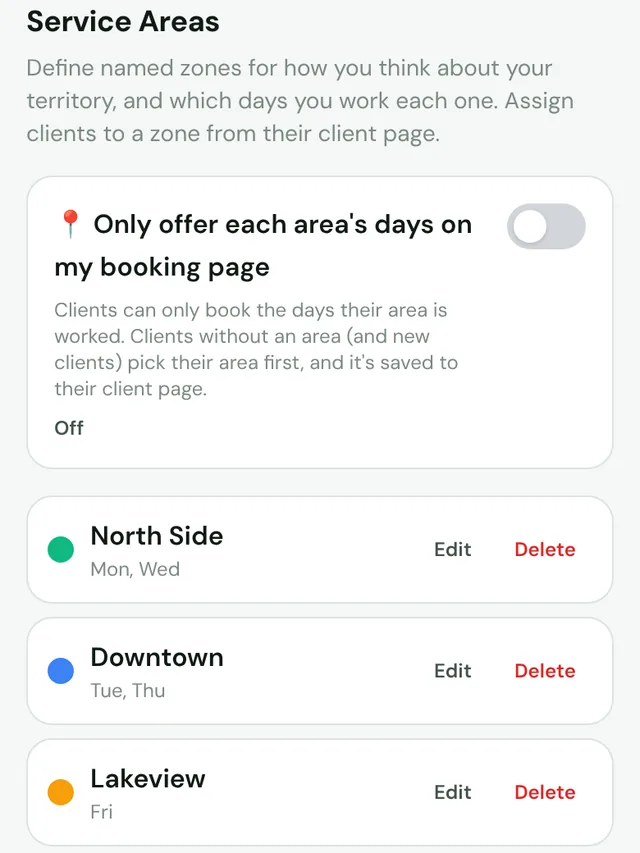
- Named, color-coded areas (Growth): set up your areas and the weekdays you work each one in Profile → Areas.
- Your day on a map (Growth): the day's stops show as numbered pins in order, with one-tap directions for the whole day in Google Maps. Clients in the areas you work that day show in full color; others fade.
- Booking by area (Growth): turn on "Only offer each area's days on my booking page" and clients can only book the days their area is worked. New clients pick their area once, and it's saved.
- Smart Reorder (Growth, 15 a month): on days with flexible appointments, it keeps timed appointments in place and fits the flexible ones where they add the least driving, with arrival times.
Common questions
How many service areas should a mobile groomer have?
Most solo mobile groomers do well with two to five. Split by direction from home or by town, and give each area its own days. Fewer, bigger areas are easier to keep to.
Should mobile groomers charge a travel fee?
Many do, for clients outside their usual area. Work it out from the extra miles there and back times your cost per mile, then round it into simple tiers, such as included inside 10 miles and a flat fee beyond.
What if a client can't make their area's day?
Keep one flexible day a week for catch-ups, or offer the nearest day you're already in a neighboring area.
Can my booking page only show each area's days?
Yes, on PawScheduler's Growth plan. Turn on booking by area in Profile → Areas and clients can only book the days their area is worked.
How do I schedule mobile grooming appointments by location?
Give each neighborhood or town its own days, and only offer clients the days their area is worked. Book the day's stops in a loop instead of zigzags. In PawScheduler, service areas, booking by area and your day on a map are on Growth.
Zone your days in minutes
Color-coded areas, booking by area and your day on a map are on Growth. Start free, no credit card.
Start freeMore from PawScheduler
Comparisons
- Groomsoft alternative for solo groomers
- Pawfinity alternative for groomers
- Best dog grooming software in 2026 (7 compared)
- MoeGo alternative for solo groomers
- Gingr alternative for solo groomers
- DaySmart Pet alternative for solo groomers
- Time To Pet alternative for groomers
- GroomBoard vs PawScheduler
- Square alternative for dog groomers
- PawScheduler vs MoeGo
- PawScheduler vs Gingr
- PawScheduler vs DaySmart Pet
Guides
- Best software for solo dog groomers
- Mobile dog grooming software
- Dog grooming scheduling software
- How to reduce no-shows in dog grooming
- Scheduling daycare and grooming
- Dog grooming income calculator
- Dog grooming vaccine tracking
- Dog grooming report card examples
- PawScheduler FAQ
- How much to charge for dog grooming
- How to start a mobile dog grooming business
- How to get more dog grooming clients
- Free dog grooming software
- Grooming software that works without cell service
Free templates
- Matted dog policy template
- Late arrival policy
- Holiday schedule texts
- Cancellation and no-show policy template
- Dog grooming waiver template
- Dog grooming text message templates
- Dog grooming intake form template