PawScheduler / Dog grooming report card examples
5 dog grooming report card examples clients actually appreciate
What to put on a grooming report card
Clients read a report card on their phone in about ten seconds. Keep it short and make it about their dog. A good one has six parts:
- A before photo and an after photo. The after photo is the one they'll share, so take it somewhere clean and bright.
- Two or three mood words. Happy, relaxed, a bit nervous, brave. Honest, but kind.
- One specific detail. Something only you would know: she leaned into the dryer, he did his nails without a fuss for the first time.
- Anything you noticed. A hot spot, a lump, ear debris, mats behind the ears. Say what you saw, not what it is, and suggest they mention it to their vet.
- One thing to do at home. Brush behind the ears twice a week, keep the face trimmed, wipe the eyes.
- When to come back. "See you in 6 weeks" does more for rebooking than any reminder.
5 report card examples to copy
Swap in the dog's name and your details. Each one fits in a text message link without scrolling forever.
1. The regular who was perfect
Mood: 😁 Happy · 😌 Relaxed
2. The matted coat and the shave-down
Mood: 🦁 Brave · 😴 Sleepy
Send the before photo with this one. It explains the haircut better than words.
3. The nervous dog making progress
Mood: 😬 A Bit Nervous · 🦁 Brave
4. The senior dog
Mood: 🐻 Cozy · 😴 Sleepy
5. The puppy's first groom
Mood: 🎉 Excited · 🚀 Restless
Before and after photo tips
- Same spot, same angle. Take both photos in the same place so the difference is obvious.
- Get down to the dog's eye level. Photos taken from above make every dog look smaller and sadder.
- Use daylight or a bright, plain wall. A cluttered tub or van floor in the background distracts from the groom.
- A squeaky toy or treat above the camera gets you ears up and eyes on the lens.
- Snap the before photo at check-in, before the brush comes out. It's also your record of the coat's condition.
What to leave out
- Blame. "He was matted because you don't brush him" loses clients. Say what you did and how to help next time.
- Diagnoses. You're not the vet. Describe what you saw and suggest they mention it.
- Prices and upsells. Keep the money talk on the invoice.
- Long paragraphs. Three short paragraphs at most.
A printable report card template
If you'd rather fill in a paper card at the van or the front desk, copy this:
Sending report cards with PawScheduler
On the Growth plan, every appointment has a 📋 Report Card button, right below the checkout buttons. Add a before photo, an after photo, a few mood tags (Happy, Relaxed, Cuddly, Sleepy, A Little Spicy, Restless, A Bit Nervous, Brave, Excited or Cozy) and a short note, then tap Send Report Card.
- The client gets a text and/or an email with a link. They don't need an app or a login to see it.
- Sending again from the same appointment updates the same card, so the client's link stays the same.
- For a multi-dog booking, the report card is for the first dog in the group for now.
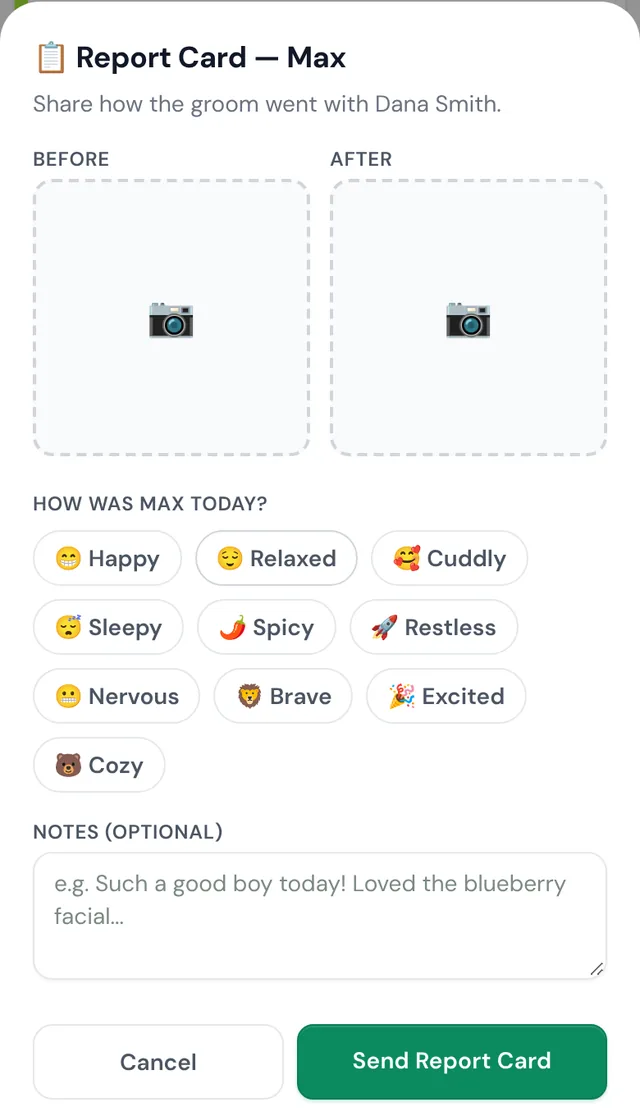
Report cards pair well with rebooking before the client leaves: end every card with the next visit.
Common questions
Should I send a report card after every groom?
If you can, yes. It takes a minute and it's the thing clients share with friends. If you're short on time, send one at least for new clients, first grooms, shave-downs and anything you noticed that the owner should know about.
What do I write when a dog was difficult?
Be honest and kind. Say what you did to help (breaks, going slow), name one thing that went well, and suggest what would help next time, like shorter, more frequent visits. The A Little Spicy and A Bit Nervous mood tags let you say it with a smile.
Should I mention skin problems or lumps on a report card?
Yes. Describe what you saw and where, and suggest the owner mention it to their vet. Don't guess at a diagnosis.
Do clients need an app to see a PawScheduler report card?
No. They get a text and/or email with a link that opens in any browser. Report cards are on the Growth plan.
Send report cards in a minute
Before/after photos, mood tags and a note, sent by text and email. Report cards are on the Growth plan; start on the free plan first, no credit card.
Start freeMore from PawScheduler
Comparisons
- Groomsoft alternative for solo groomers
- Pawfinity alternative for groomers
- Best dog grooming software in 2026 (7 compared)
- MoeGo alternative for solo groomers
- Gingr alternative for solo groomers
- DaySmart Pet alternative for solo groomers
- Time To Pet alternative for groomers
- GroomBoard vs PawScheduler
- Square alternative for dog groomers
- PawScheduler vs MoeGo
- PawScheduler vs Gingr
- PawScheduler vs DaySmart Pet
Guides
- Best software for solo dog groomers
- Mobile dog grooming software
- Dog grooming scheduling software
- How to reduce no-shows in dog grooming
- Mobile grooming service areas
- Grooming software that works without cell service
- Scheduling daycare and grooming
- Dog grooming income calculator
- Dog grooming vaccine tracking
- PawScheduler FAQ
- How much to charge for dog grooming
- How to start a mobile dog grooming business
- How to get more dog grooming clients
- Free dog grooming software
Free templates
- Matted dog policy template
- Late arrival policy
- Holiday schedule texts
- Cancellation and no-show policy template
- Dog grooming waiver template
- Dog grooming text message templates
- Dog grooming intake form template