PawScheduler / Dog grooming scheduling software
Dog grooming scheduling: how to plan your day, and the software that helps
How long to book each service
These are typical starting points for a solo groomer. Matted coats, doodles, seniors and nervous dogs run long, so time your own grooms for two weeks and adjust.
| Service | Small | Medium | Large | Extra large |
|---|---|---|---|---|
| Bath and brush | 45–60 min | 60–75 min | 75–90 min | 90–120 min |
| Full groom (bath, haircut, nails) | 75–90 min | 90–120 min | 2–2.5 hours | 2.5–3+ hours |
| Deshed treatment | 45–60 min | 60–90 min | 90–120 min | 2–3 hours |
| Puppy introduction | 30–45 minutes, kept short and positive | |||
| Nails only | 10–15 minutes | |||
Once you've set times like these per service and size, the calendar should fill in the length for you when you pick services, so you aren't doing the math on every booking.
Leave room between appointments
- In a shop or home studio: 10 to 15 minutes between dogs for cleanup, drying stragglers and checkout.
- Mobile: your drive time plus about 10 minutes to park, set up and greet the next owner. Booking clients by area on set days cuts the driving most.
- One real break: block 30 minutes mid-day on your calendar so it can't be booked over.
How many dogs a day
Many solo groomers settle at about 4 to 6 full grooms a day, more if the day is mostly baths and small dogs. Set a daily limit in your software so online booking can't overfill you. Two habits help: put your hardest or biggest dog first while you're fresh, and book puppies and seniors at quieter times.
How often to rebook, by coat type
Rebooking before the owner leaves is the single best way to keep a full calendar. Typical intervals:
| Coat | Examples | Rebook every |
|---|---|---|
| Curly, non-shedding | Doodles, poodles, bichons | 4–6 weeks |
| Long and silky | Shih Tzus, Yorkies, Maltese | 4–6 weeks |
| Double coat | Huskies, goldens, shepherds | 8–12 weeks, more often in shedding season |
| Short and smooth | Labs, beagles, boxers | 8–12 weeks for a bath and nails |
| Nails only | Any | 3–4 weeks |
Recurring appointments make this automatic: set the interval once and the whole series lands on the calendar.
A sample day for a mobile groomer
- 8:00 Goldendoodle, full groom (2.5 hours)
- 10:30 Drive and set up (20 minutes)
- 10:50 Shih Tzu, full groom (90 minutes)
- 12:20 Lunch break (30 minutes, blocked)
- 12:50 Drive and set up (20 minutes)
- 1:10 Two beagles from one household, bath and nails (90 minutes, booked as one appointment)
- 2:40 Drive and set up (15 minutes)
- 2:55 Puppy introduction (40 minutes)
Four stops, five dogs, finished before 4. A day map that puts the stops in order with turn-by-turn directions keeps the driving short.
Set up your schedule in 20 minutes
- Add your services with a price and a length for each dog size.
- Set your working hours, your lunch break and any days off or vacation.
- Set a daily limit so online booking can't overfill you.
- Put your regulars on recurring appointments at their coat's interval.
- Choose when reminders go out, and ask clients to confirm 48 hours ahead.
- Decide whether new clients need your approval before a booking is confirmed.
- Write your no-show policy (here's a free template) and, if you charge one, keep a card on file.
- Share your booking link (ready-made messages).
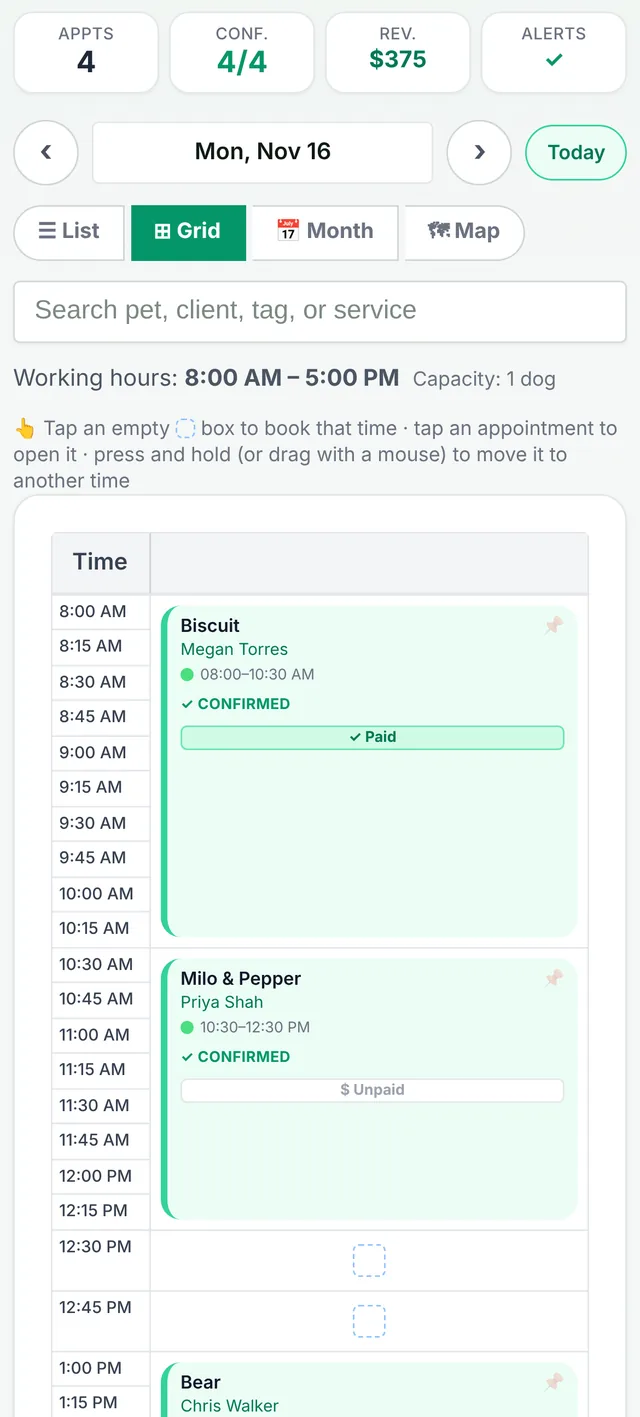
Features that separate a grooming calendar from a generic one
Multi-pet bookings
Book several dogs from one household in a single action. Each pet keeps its own services, price and duration.
Automatic duration and pricing
Set how long each service takes and what it costs by dog size once. When you pick services, the appointment length and price fill in. Durations can run up to eight hours for long creative grooms.
Recurring appointments
Set weekly, every 2 to 8 weeks, or monthly repeats with an end date. Dates that are already full are skipped, and you get a summary of what was created and what wasn't, so nothing double-books.
Self-booking link
Share a personal booking link. Clients verify with their name and the last four digits of their phone number, then pick an open time. No app to download and no account to create. You can require approval before a booking is confirmed if you want to vet new clients.
Reminders and confirmations
Email reminders go out automatically on every plan: your first 25 appointments a month on Free, unlimited on Growth, where you also choose when they're sent. On Growth, reminders also go out by text from your own business number, and clients can text you back. On Growth you can ask clients to confirm 48 hours ahead and send a manual reminder with one tap.
Daycare alongside grooming
On Growth, clients pick a drop-off and pick-up time. Daycare dogs have their own limit and never take up your grooming slots.
No-show protection
Once card payments are on (every plan), clients can save a card on file when they book, agreeing to your no-show and late-cancellation policy. If they don't show, you charge the fee in one tap.
Cancellation rules
With the AI texting assistant add-on, the assistant enforces a 24-hour cancellation policy automatically when clients cancel by text.
Booking by text instead of by form
Many clients would rather text than use a booking page. With the AI texting assistant add-on (any plan: $10 per 100 replies, 25 free on Growth), they text the PawScheduler scheduling number, the assistant checks your actual calendar, offers times that are genuinely open, and books the one they pick. It respects your working hours, breaks and existing appointments.
What comes on which plan
| Scheduling feature | Free | Growth |
|---|---|---|
| Calendar (list, grid and month views) | Yes | Yes |
| Your own services and prices | Unlimited | Unlimited |
| Appointments per month | 50 | Unlimited |
| Self-booking link | First 14 days | Yes |
| Email reminders | First 25 appointments a month | Unlimited |
| Text reminders from your own business number | No | Yes |
| Recurring appointments | No | Yes |
| Daycare scheduling | No | Yes |
| Multi-pet bookings | No | Yes |
| Day map with turn-by-turn directions | No | Yes |
| AI booking by text | Add-on | Add-on |
Common questions
How long should I book a full dog groom?
As a starting point, about 75 to 90 minutes for a small dog, 90 minutes to 2 hours for a medium dog, 2 to 2.5 hours for a large dog and 2.5 to 3 or more hours for an extra-large dog. Matted coats, doodles and nervous dogs take longer, so time your own grooms and adjust.
How often should grooming clients rebook?
Curly and long-coated dogs such as doodles, poodles and Shih Tzus usually need a groom every 4 to 6 weeks. Double-coated and short-coated dogs usually come every 8 to 12 weeks, and nail trims every 3 to 4 weeks.
How many dogs can a solo groomer do in a day?
Many solo groomers settle at about 4 to 6 full grooms a day, more if most are baths or small dogs. Setting a daily limit in your scheduling software stops online booking from overfilling the day.
What should dog grooming scheduling software include?
At minimum: a calendar, client and pet records, automatic reminders and a way for clients to book online. Multi-pet bookings, recurring appointments and automatic durations save the most time for working groomers.
Can clients book a grooming appointment without downloading an app?
Yes. PawScheduler clients use a personal booking link in any browser, or by text with the AI texting assistant add-on. No app or account is needed.
Does PawScheduler prevent double-booking?
Yes. It respects your working hours and existing appointments, and recurring series skip dates that are already full.
Can I set up recurring grooming appointments?
Yes, on Growth. Choose weekly, every 2, 3, 4, 5, 6 or 8 weeks, or monthly with an end date, and PawScheduler creates them all at once.
Try it on your real schedule
The free plan covers up to 50 appointments a month. No credit card.
Start freeMore from PawScheduler
Comparisons
- Groomsoft alternative for solo groomers
- Pawfinity alternative for groomers
- Best dog grooming software in 2026 (7 compared)
- MoeGo alternative for solo groomers
- Gingr alternative for solo groomers
- DaySmart Pet alternative for solo groomers
- Time To Pet alternative for groomers
- GroomBoard vs PawScheduler
- Square alternative for dog groomers
- PawScheduler vs MoeGo
- PawScheduler vs Gingr
- PawScheduler vs DaySmart Pet
Guides
- Best software for solo dog groomers
- Mobile dog grooming software
- Dog grooming software pricing
- How to reduce no-shows in dog grooming
- Mobile grooming service areas
- Grooming software that works without cell service
- Scheduling daycare and grooming
- Dog grooming income calculator
- Dog grooming vaccine tracking
- Dog grooming report card examples
- PawScheduler FAQ
- How much to charge for dog grooming
- How to start a mobile dog grooming business
- How to get more dog grooming clients
- Free dog grooming software
Free templates
- Matted dog policy template
- Late arrival policy
- Holiday schedule texts
- Cancellation and no-show policy template
- Dog grooming waiver template
- Dog grooming text message templates
- Dog grooming intake form template