PawScheduler / Dog grooming staff scheduling
Staff scheduling for a dog grooming shop
Set the usual week first
- Work days for each person.
- Hours, if they differ from the shop's (a bather from 8 to 2, a groomer from 9 to 5).
- Breaks, such as lunch from 12:30 to 1:00, so nothing is booked over them.
- Dogs at once, so a groomer who takes one dog at a time isn't double-booked.
Then plan the weeks ahead
Real weeks never match the usual one. A weekly roster lets you change one date without touching the pattern: Bobby swaps Tuesday for Saturday this week only. Copy last week when nothing changes, and plan a month at a time before the holidays.
Time off
Record vacations and appointments as time off on that person's schedule. Check what's already booked in those days before you approve it, and move those dogs to someone else or call the clients.
In PawScheduler, staff ask for time off from their own login, and you approve or decline in one tap. When you approve, it tells you which dogs are already booked with them that day.
Tell people when it changes
A schedule nobody sees doesn't help. Text each person their changed days, and send a morning list of their dogs so nobody has to open the app to know their day.
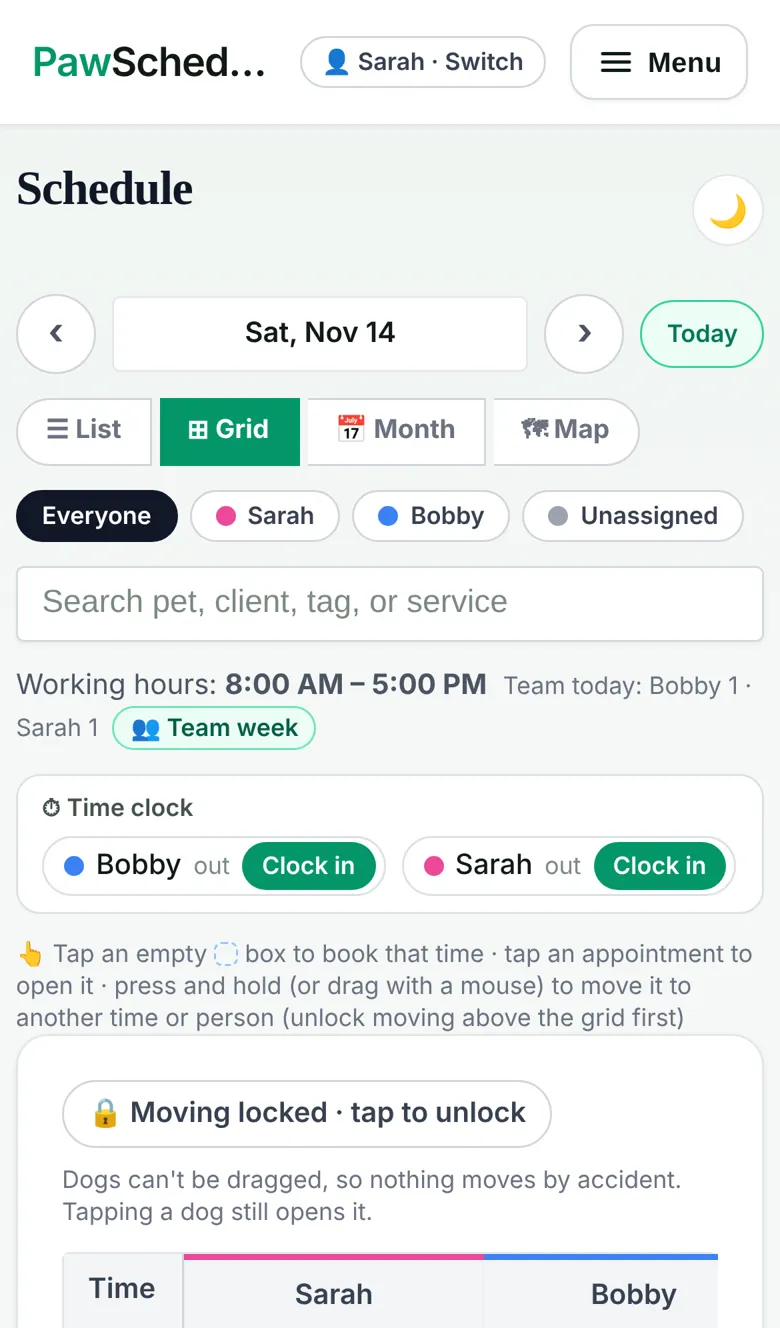
How PawScheduler does it
- Profile → Team: each person's role, color, dogs at once, days, hours, breaks and time off.
- Team week (on the Schedule): who's in each day. Tap a day to change it for that date only, ⧉ Copy last week, or ↻ Repeat for the next 3 weeks, then 📱 Text them their changes.
- Bookings follow it: the booking page, the AI texting assistant and morning texts all use Team week, hours, breaks and time off.
- Alerts: each person is told when a dog is added to their day, moved or cancelled, and when a dog is up for grabs.
- Time clock: Clock in and Clock out on today's Schedule, feeding payroll.
Team is $79.99 a month for 3 people (up to 5 with $15 extra seats). See everything in Team.
Common questions
How do I schedule staff in a grooming shop?
Set each person's usual days, hours, breaks and how many dogs they take at once, then use a weekly roster for one-off changes and record time off. Make sure online booking follows the same schedule, so clients can't book someone who's off.
Can clients book a groomer on their day off?
Not in PawScheduler. The booking page and the AI texting assistant only offer times when that person is working and free, using Team week, their hours, breaks and time off.
Can I plan a month ahead?
Yes. In Team week, change any day for that date only, copy last week, or repeat a week for the next 3 weeks, then text everyone their changes.
Does PawScheduler have a time clock?
Yes, on Team. Each person clocks in and out on today's Schedule, and payroll fills in their hours. A timesheet lets you fix a missed clock-out.
Try it on your real schedule
Start free with a 14-day Growth trial, then switch to Team when your people are set up. No credit card.
Start freeMore from PawScheduler
For grooming teams
- Dog grooming software for teams (2–5 people)
- Dog grooming salon software for small shops
- Bather and groomer scheduling
- How to pay dog groomers (commission vs hourly)
- Hiring your first dog bather
Comparisons
- Groomsoft alternative for solo groomers
- Pawfinity alternative for groomers
- Best dog grooming software in 2026 (7 compared)
- MoeGo alternative for solo groomers
- Gingr alternative for solo groomers
- DaySmart Pet alternative for solo groomers
- Time To Pet alternative for groomers
- GroomBoard vs PawScheduler
- Square alternative for dog groomers
- PawScheduler vs MoeGo
- PawScheduler vs Gingr
- PawScheduler vs DaySmart Pet
Guides
- Texting software for dog groomers
- Dog grooming software prices compared
- Best software for solo dog groomers
- Mobile dog grooming software
- Dog grooming scheduling software
- Dog grooming software pricing
- How to reduce no-shows in dog grooming
- Mobile grooming service areas
- Grooming software that works without cell service
- Scheduling daycare and grooming
- Dog grooming income calculator
- Dog grooming vaccine tracking
- Dog grooming report card examples
- How much to charge for dog grooming
- How to start a mobile dog grooming business
- How to get more dog grooming clients
- Free dog grooming software
- PawScheduler FAQ
Free templates
- Matted dog policy template
- Late arrival policy
- Holiday schedule texts
- Cancellation and no-show policy template
- Dog grooming waiver template
- Dog grooming text message templates
- Dog grooming intake form template