PawScheduler / Software for small grooming teams
Software for small dog grooming teams
Who Team is for
- A groomer who just hired a bather. The bather sees the dogs they're bathing and what's next, without access to your revenue or settings.
- Two or three groomers sharing a shop. One booking link for the shop, and clients can pick a groomer or take the first opening.
- A mobile van plus a salon chair. Each person keeps their own days and hours on the same schedule.
If you have more than 3 people, several locations, or run boarding or a kennel, Team isn't the right fit. Tools like Gingr or DaySmart Pet are built for that size of business.
What's included
The schedule
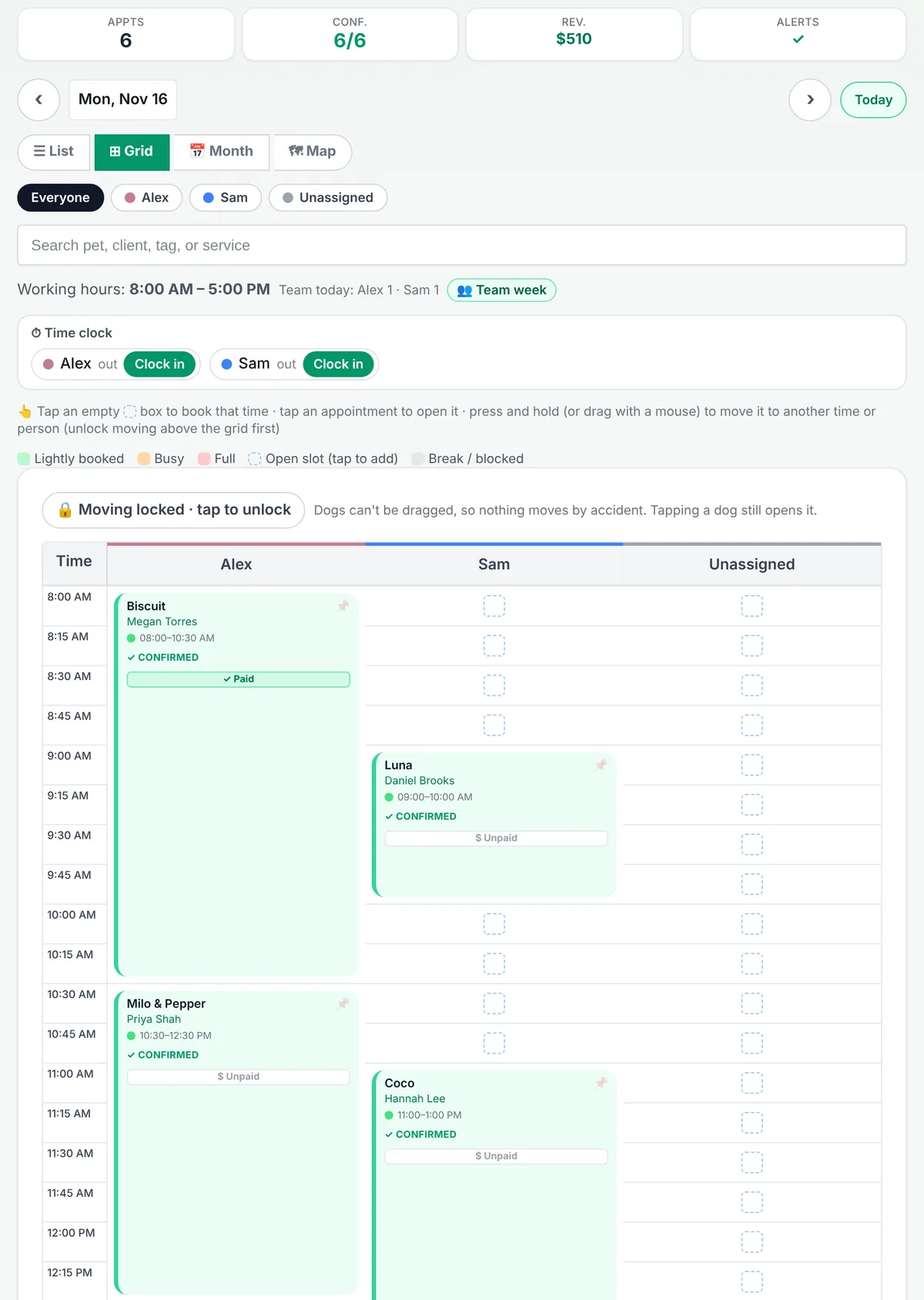
- Everyone on one schedule, with a column for each person.
- Each person's own work days, hours and time off.
- A team week view to plan who's in each day.
- Online bookings go to whoever is free, or to the groomer the client picks.
Your people
- A morning text to each groomer with their dogs for the day.
- Payroll with commission or hourly pay, plus tips.
- An owner PIN that keeps billing, revenue and settings behind a lock.
- Optional PIN for each person ("Who's working?") so the app knows who's using it, with limits for groomers and bathers.
Team also includes everything in Growth: text reminders from your own business number, multi-dog bookings, vaccine alerts, route planning, payment links through your own Stripe account with no PawScheduler fee, and 250 AI assistant replies a month.
How bookings are shared out
When a client books online, they can pick a groomer or choose "first available". PawScheduler only offers times where someone is working and free, using each person's hours, breaks and time off. The AI texting assistant follows the same rules: a client can text "Is Sarah free Tuesday?" and it checks Sarah's openings, or it books the client with their usual groomer.
Team compared with the usual options
| Option | Typical fit | What to watch |
|---|---|---|
| Each groomer on their own solo app | Groomers renting chairs who run separate businesses. | No shared schedule, separate booking links, no payroll. |
| PawScheduler Team ($79.99/mo) | 2 or 3 groomers or bathers on one schedule. | Up to 3 people. Not for boarding, kennels or several locations. |
| Facility software (Gingr, DaySmart Pet) | Bigger salons, daycares and boarding. | More setup, and higher tiers for multi-staff features. Check their current pricing. |
Moving your team over
Coming from MoeGo, upload your client export in Clients → Import and your clients, pets and upcoming appointments come over in minutes. From any other app or a paper book, we import your client list for free. See switching to PawScheduler.
Common questions
Is there dog grooming software for 2 or 3 groomers?
Yes. PawScheduler Team is $79.99 a month for up to 3 groomers or bathers on one shared schedule, with a column and work days for each person, bookings to whoever is free, a morning text of each groomer's dogs, and payroll with commission or hourly pay and tips.
Can clients pick their groomer when booking online?
Yes. On Team, clients can pick a groomer or take the first available opening. The AI texting assistant can also book a client with their usual groomer.
Does PawScheduler do payroll for groomers?
Team includes payroll with commission or hourly pay plus tips. It works out what each person earned; you pay them the way you already do.
Can my bather use the app without seeing my revenue?
Yes. Set an owner PIN and billing, revenue and settings stay locked. Each person can have their own PIN, with limits for groomers and bathers.
How many people can be on PawScheduler Team?
Up to 3 groomers or bathers. PawScheduler is not built for larger salons, several locations, boarding or kennels.
Is there a free trial of Team?
Every new account starts with a 14-day free trial of Growth, no credit card. You can move to Team from the plans page in the app at any time.
Try it on your real schedule
Start free with a 14-day Growth trial, then pick Team when your people are set up. No credit card.
Start freeMore from PawScheduler
Comparisons
- Groomsoft alternative for solo groomers
- Pawfinity alternative for groomers
- Best dog grooming software in 2026 (7 compared)
- MoeGo alternative for solo groomers
- Gingr alternative for solo groomers
- DaySmart Pet alternative for solo groomers
- Time To Pet alternative for groomers
- GroomBoard vs PawScheduler
- Square alternative for dog groomers
- Vagaro and Acuity alternative for dog groomers
Guides
- Best software for solo dog groomers
- AI texting assistant for dog groomers
- Switching to PawScheduler
- Mobile dog grooming software
- Dog grooming scheduling software
- Dog grooming software pricing
- How to reduce no-shows in dog grooming
- Mobile grooming service areas
- Grooming software that works without cell service
- Scheduling daycare and grooming
- Dog grooming income calculator
- Dog grooming vaccine tracking
- Dog grooming report card examples
- PawScheduler FAQ
- How much to charge for dog grooming
- How to start a mobile dog grooming business
- How to get more dog grooming clients
- Free dog grooming software
Free templates
- Matted dog policy template
- Late arrival policy
- Holiday schedule texts
- Cancellation and no-show policy template
- Dog grooming waiver template
- Dog grooming text message templates
- Dog grooming intake form template